


| Introduction | Caveat |
| Key Statistics | Shopping for a Digital Camera |
| Durability | Links |
| Calculating Capacity |
Digital cameras work by detecting light electronically, then sending numbers indicating the colour of each pixel in the image to a computer for further Photo-shop style processing and distribution. Typically the software that comes with the camera converts the raw image to a more compact JPG (Joint Photographic experts Group) image.
Most cameras have USB (Universal Serial Bus) port to upload images. Some use WiFi (Wireless Fidelity) (which requires you have a WiFi router.) For rapid uploading some have a memory card or a thumb drive. The advantage of the cards is you can store a dozen or so on a trip to later upload into a computer. The disadvantages of the memory cards is they are often fragile, expensive and may not be compatible with all computers. Some cameras write to magnetic tape or DVDs (Digital Video Discs). Older models use serial ports, now rare on computers.
The key statistics to know about a camera:
Check with your local college for a short course on the use of such equipment. You will gain familiarity with the equipment before you waste money on inappropriate equipment and with your instructor’s help will find cost effective equipment.
The screen-style viewfinder, review screen takes up so much battery power, you will rarely want to use it.
When digital cameras first came out around 2000, they competed on lens quality and the number of photos they could contain. Now they compete on styling, Photo-shop style digital effects you can do right in the camera and light weight.
Super high res is not necessary if you just plan to post your photos on the net. A full screen photo is only 1920 × 1200. A typical posted photo is much smaller, perhaps 300 × 300. A entry level digital camera will still give you giant 5152 × 3864. This resolution is for printing images on photo-quality paper.
A traditional camera will be passed down the generations. Not so with a digital camera. It has a life of about 5 years. The camera will not break, but the interfaces, drivers and software will become obsolete and the manufacturer will not upgrade them.
Usually manufacturers no longer tell you how many images or how many minutes of video their camera will hold. Here is how to estimate: Presuming 24-bit (3-byte) colour depth (another spec reluctantly revealed):
A gigabyte in advertising literature is 1,000,000,000 bytes. So just take the memory of the capacity of the camera in gigabytes (not megabytes), multiply by 1,000,000,000 to get the capacity in bytes, then divide by the image size in bytes to approximate how many images the camera can hold.
It is up to you to buy memory for your camera in the form of an SD card (up to 8Gig), SDHC card (up to 32 Gig), or SDXC (up to 2 Terabytes). Typically no memory card will come with the camera.
A second of video takes 30 images. So compute how many images can fit in the camera’s memory, then divide by 30 to figure out how many seconds of video at that resolution the camera can hold.
If the specs don’t tell you the maximum image size, you can estimate it by taking the square root of the size in pixels, e.g. 36MP (Member of Parliament) (megapixels) is 36,000,000 pixels. The square root is 6000. So the maximum image is on the order of 6000 × 6000.
Hackers can surreptitiously turn on your webcam and spy on you. To defeat them you must disconnect your webcam.
You won’t find any low end digital cameras. People who want cheap Brownie-quality images just buy a cellphone with a camera. Even the lowest cost digital cameras suffer from featuritis. Thankfully, many of these features are fully automatic.
$69.40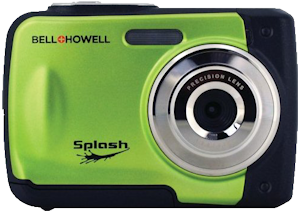 |
recommend electronic⇒Bell & Howell WP10-G Splash Waterproof Digital Camera | |||||||||||||||||||||||||||||||||||||||||||||
| asin | B01CO27ABI | |||||||||||||||||||||||||||||||||||||||||||||
|---|---|---|---|---|---|---|---|---|---|---|---|---|---|---|---|---|---|---|---|---|---|---|---|---|---|---|---|---|---|---|---|---|---|---|---|---|---|---|---|---|---|---|---|---|---|---|
| dim | 1.27 × 2.54 × 10.16 cm ½ × 1 × 4 in | |||||||||||||||||||||||||||||||||||||||||||||
| 12.0 Megapixel, Waterproof only up to 10 feet. 8x digital zoom; Automatic face detection; Antishake image stabilization; 6 scene modes; 12 picture modes; Built-in flash ; Compatible with microSD(TM) Cards up to 16GB, Requires 2 AAA batteries. Green. Also comes in blue and yellow and sometimes purple. Users on amazon.ca complained of very short battery life and blurry pictures. | ||||||||||||||||||||||||||||||||||||||||||||||
| ||||||||||||||||||||||||||||||||||||||||||||||
| Greyed out stores probably do not have the item in stock | ||||||||||||||||||||||||||||||||||||||||||||||
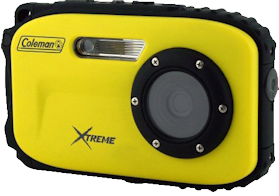 |
recommend electronic⇒Coleman Xtreme C5WP 12 MP 33ft Waterproof Digital Camera | |||||||||||||||||||||||||||||||||||||||||||||
| asin | B004SB1X44 | |||||||||||||||||||||||||||||||||||||||||||||
|---|---|---|---|---|---|---|---|---|---|---|---|---|---|---|---|---|---|---|---|---|---|---|---|---|---|---|---|---|---|---|---|---|---|---|---|---|---|---|---|---|---|---|---|---|---|---|
| This is the same Coleman that makes camping equipment. Yellow. Also comes is black, blue, green and red. 2.7” LCD monitor. This is a simple, rugged waterproof camera. It can survive down to 33 feet. It can survive drops of 3 feet. Has Digital image stabilisation. Micro SD supports up to 8 GB. Self timer and smile shutter. Automatically focuses on faces. Resolution approximately 3400 × 3400. Works at temperatures below freezing. It can even take short movies. Specs. | ||||||||||||||||||||||||||||||||||||||||||||||
| ||||||||||||||||||||||||||||||||||||||||||||||
| Greyed out stores probably do not have the item in stock | ||||||||||||||||||||||||||||||||||||||||||||||
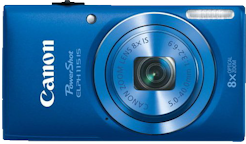 |
recommend electronic⇒Canon PowerShot ELPH 115 16MP Digital Camera | |||||||||||||||||||||||||||||||||||||||||||||
| asin | B00B5HE3IW | |||||||||||||||||||||||||||||||||||||||||||||
|---|---|---|---|---|---|---|---|---|---|---|---|---|---|---|---|---|---|---|---|---|---|---|---|---|---|---|---|---|---|---|---|---|---|---|---|---|---|---|---|---|---|---|---|---|---|---|
| Blue. Also comes in black, pink and silver. 2.7” LCD monitor. 8 × optical zoom. 136 grams. Includes battery pack and battery charger. WiFi connection. They do not advertise the maximum image size, but at 16 megapixels it will be equivalent to 4000 × 4000. Specs. | ||||||||||||||||||||||||||||||||||||||||||||||
| ||||||||||||||||||||||||||||||||||||||||||||||
| Greyed out stores probably do not have the item in stock | ||||||||||||||||||||||||||||||||||||||||||||||
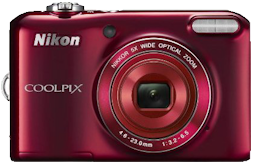 |
recommend electronic⇒Nikon COOLPIX L28 20.1 MP Digital Camera | |||||||||||||||||||||||||||||||||||||||||||||
| asin | B00B7N9CB2 | |||||||||||||||||||||||||||||||||||||||||||||
|---|---|---|---|---|---|---|---|---|---|---|---|---|---|---|---|---|---|---|---|---|---|---|---|---|---|---|---|---|---|---|---|---|---|---|---|---|---|---|---|---|---|---|---|---|---|---|
| 5× zoom lens and 3" LCD. Glass lens. Red. Also comes in pink, black and silver. Has Digital image stabilisation. 164 grams. Takes SD, SDHC or SDXC memory cards. Highly automated for the beginner. For example it can automatically wait for the subject to smile before clicking. The camera is slow if you try to take shots in rapid succession — 1.2fps. They don’t specify the maximum image size, but with 20.1 MP it will be huge, equivalent to 4472 × 4472. Spec. | ||||||||||||||||||||||||||||||||||||||||||||||
| ||||||||||||||||||||||||||||||||||||||||||||||
| Greyed out stores probably do not have the item in stock | ||||||||||||||||||||||||||||||||||||||||||||||
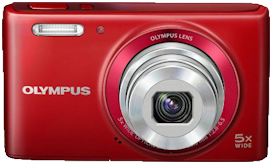 |
recommend electronic⇒Olympus Stylus VG-180 16 MP Compact Camera | |||||||||||||||||||||||||||||||||||||||||||||
| asin | B00C7NX884 | |||||||||||||||||||||||||||||||||||||||||||||
|---|---|---|---|---|---|---|---|---|---|---|---|---|---|---|---|---|---|---|---|---|---|---|---|---|---|---|---|---|---|---|---|---|---|---|---|---|---|---|---|---|---|---|---|---|---|---|
| This product is not in stock at any of the Amazon stores. Red. Also comes in silver and black. Basic digital camera. Has Digital image stabilisation. 122 grams. Takes SD, SDHC or SDXC memory cards. 4608 × 3456 Image. 640 × 480 Video. Even though it is an entry level camera, it has dozens of frivolous electronic features. Automatically identifies the scene you’re shooting — 30 different scene modes including Portrait, Landscape, Night + Portrait, Macro or Sports — and it adjusts the settings for ideal results. Durable. Compact. This is the sort of camera you can carry with you in a pocket or give to kids. | ||||||||||||||||||||||||||||||||||||||||||||||
| ||||||||||||||||||||||||||||||||||||||||||||||
| Greyed out stores probably do not have the item in stock | ||||||||||||||||||||||||||||||||||||||||||||||
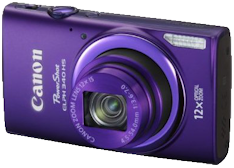 |
recommend electronic⇒Canon PowerShot ELPH 340 HS 16MP Digital Camera | |||||||||||||||||||||||||||||||||||||||||||||
| asin | B00HLDIDVM | |||||||||||||||||||||||||||||||||||||||||||||
|---|---|---|---|---|---|---|---|---|---|---|---|---|---|---|---|---|---|---|---|---|---|---|---|---|---|---|---|---|---|---|---|---|---|---|---|---|---|---|---|---|---|---|---|---|---|---|
| Purple. Also comes in black and silver. 12 × optical zoom. Unusually sharp pictures. Not particularly fast for repeated shots. WiFi connection. Automatically selects the proper camera settings based on 32 predefined shooting situations. Images up to 4608 × 3072. Includes an 8Gb memory card. HD 1280 × 720 video. Specs. | ||||||||||||||||||||||||||||||||||||||||||||||
| ||||||||||||||||||||||||||||||||||||||||||||||
| Greyed out stores probably do not have the item in stock | ||||||||||||||||||||||||||||||||||||||||||||||
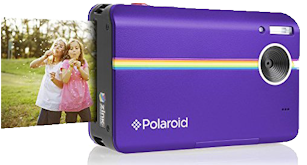 |
recommend electronic⇒Polaroid 10MP Digital Instant Print Camera | |||||||||||||||||||||||||||||||||||||||||||||
| asin | B00MG2WYSG | |||||||||||||||||||||||||||||||||||||||||||||
|---|---|---|---|---|---|---|---|---|---|---|---|---|---|---|---|---|---|---|---|---|---|---|---|---|---|---|---|---|---|---|---|---|---|---|---|---|---|---|---|---|---|---|---|---|---|---|
| Model Z2300. Purple. Also comes in blue, red, white and black. Different colours have different prices. Uses Zink zero-ink technology to create 2 × 3” prints in a minute. The paper costs about 30¢ a sheet. Spec. | ||||||||||||||||||||||||||||||||||||||||||||||
| ||||||||||||||||||||||||||||||||||||||||||||||
| Greyed out stores probably do not have the item in stock | ||||||||||||||||||||||||||||||||||||||||||||||
 |
This page is posted |
http://mindprod.com/bgloss/digitalcamera.html |
Optional Replicator mirror
|
J:\mindprod\bgloss\digitalcamera.html | |
 |
Please read the feedback from other visitors,
or send your own feedback about the site. Contact Roedy. Please feel free to link to this page without explicit permission. | |
| Canadian
Mind
Products
IP:[65.110.21.43] Your face IP:[18.191.180.252] |
| |
| Feedback |
You are visitor number | |


