


 DVD
DVD
CDs (Compact Discs) and DVDs look almost identical. DVDs were designed to be exactly the same size so you could play old CDss on new DVD players. Blanks will have the letters CD-R, DVD-R, DVD+R, DVD-RW or Blu-Ray Disc in pale writing on the top surface to help you tell them apart. Audio usually comes on CDs. Video comes on DVDs. High definition video comes on Blu-Ray DVDs. Small programs come on CD big ones on DVD Video DVDs are often copy protected. CDs are not. You can find out what you have by letting a disc copier program such as Power2Go have a sniff. Windows is no help. It thinks everything is a CD.
The important difference you cannot see: CDs hold 650 MB (enough for 74 minutes of uncompressed audio), DVDs hold 4.7 GB (7 CDs worth) and Blue Rays hold 50 GB (77 CDs ) on a dual layer disc.
| Logo | Scheme | Capacity | Rotation Speed
relative to an audio CD |
Notes | Cost |
|---|---|---|---|---|---|
 |
Blu-Ray | 25 GB/54 GB | 1 | Sometimes called BD (Blu-ray Disc). high capacity. Used for High Definition movies. Uses a blue laser to read them. The dual layer disks hold 54 GB. That is equivalent to 20 hours of standard video. Heavily encrypted to prevent copying. This is the format Microsoft, Sony, Lion’s Gate, MGM (Male Genital Mutilation), Columbia, Fox, Disney and Wal-Mart are backing. Blu-Ray DVDs allow interactivity controlled by Java programs, though I have not heard the details of how this is supposed to work. The scheme is called BD-J (Blu-ray Disc Java). They come in R and RW versions. You can buy pre-recorded Blu Ray DVDs with movies on them. Players can take ridiculously long time to load. For example the Pioneer BDP-Lx71 takes almost 2 minutes. Maybe they have whacking huge look-ahead buffers to handle error correction. Super multi just refers to the drive’s ability to read and write all the usual formats. |
each. Last revised/verified: 2009-03-20 |
 |
HD DVD | 15 GB/30 GB | 1 | Paramount supports only this format. Heavily encrypted to prevent copying. Developed by Toshiba and NEC (Nippon Electric Corporation). You buy them pre-recorded with movies in encrypted format. You don’t usually record your own material on them. Only proprietary hardware that prevents copying can read them. Provides sufficient resolution for full HDTV (High Definition Television). Like Blu-ray, it uses a short wavelength blue laser. Players cost half as much as Blu-ray and is more reliable, yet oddly it lost the format wars. On 2008-02-18 Toshiba threw in the towel and discontinued manufacturing players and discs. I think the Blu-Ray people won by repeatedly telling a small lie, that you needed Blu-Ray to get high definition. Naive users thought Blu-Ray was the only choice for HD. I think also Blu-Ray was a more distinctive name. HDDVD did not sound like a distinct product. | |
 |
DVD-Video, DVD5/DVD9 | 4.7 GB/9.2 GB | ? | Time-Warner, Disney, MGM/UA etc. backing. read only. Created by mass duplication. The dual layer disks hold 9.2 GB. | Blanks are not generally available since is illegal to duplicate movies. |
 |
DVD-R | 4.7 GB | 8-48 | write once | each. Last revised/verified: 2009-03-20 |
 |
DVD-RW | 4.7 GB | 2.4 | write many times | each. Last revised/verified: 2009-03-20 |
 |
DVD+R | was 3.0 GB/side, now 4.7 per side. With double layer 8.5. | 18 | compatible with DVD-RAM. writableonce. DVD +r has a slightly more robust tracking system than DVD-R. My 16× drive writes 11.4 megabytes a second, considerably faster than CDW (Compact Disc — Writeable) drive. | each. Last revised/verified: 2009-03-20 |
 |
DVD+RW | was 3.0 GB/side, now 4.7 per side. With double layer 8.5. | 8 | compatible with DVD-RAM. rewritable. | each. Last revised/verified: 2009-03-20 |
 |
DivX | n/a | ? | scheme to allow game or video rental | Not available to the public. |
 |
DVD-RAM | 2.6 GB/side | ? | used in Hitachi camcorders | each. Last revised/verified: 2009-03-20 |
Normal DVDs are only intended to last about a decade. There are many manufacturers who create archival quality blanks. Some will work in any DVD writer; some require one with the M-DISC feature.
If you plan to use archival disks, check before you buy writer or blanks that they are compatible with your drive.
M-DISC is an option to make DVDs and Blu-Ray disks last 1000 years. It uses special blanks containing metals rather than the usual organic dyes. They work in ordinary DVD drives with ordinary DVD software.
For casual use, buy a red Sharpie fine tip permanent marker to write the password/serial number/key on the top side of the DVD where you can’t lose it. Don’t apply any sort of sticky label since it may come off inside the drive, or unbalance the rotation, unless it is specially designed for DVD s. Don’t use any other sort of pen or you will crack the surface.
The LightScribe system is no longer, though you can still buy blanks if you have LightScribe drive. You can buy blank DVDs with a paper coating on one side. They can be inserted into an inkjet printer fitted with a DVD holder to make multi-colour professional looking labels. Not all inkjet drives come with a DVD holder or can be fitted with one.
The rotation speed is not really the statistic you want. You want the transfer rate in megabytes per second. However, those numbers were not readily available. The main thing you can learn from these numbers in that RW disks are much slower than R disks to record. Further, you need an extra erase pass.
You would think DVDs would play from the outside in, like vinyl LPs (Long Play recordings) but they start at the centre and work out. This seems odd given the outer tracks are longer than the inner. The advantage of this is it often leaves the outer tracks unused which are often smeared with fingerprints by people failing to pick up the DVDs properly.
DVD-R DL (double layer) holds 8.5 GB.
DVD Blu-Ray holds 25 GB/54 GB.
DVD drives compete on cost, so the quality has dropped over the years. You are lucky if they survive a year. They drive you crazy popping open when you don’t want them to and closing unexpectedly when you want them to stay open and refusing to open when you press the button. You give them a command and like a reluctant child, they procrastinate far longer than reasonable reacting to it. I don’t know if the fault lies with W7-32, W7-64, W8-32, W8-64, W2012, W10-32 and W10-64 the device driver or the disk hardware. There is no brand I can recommend. Paying a lot of money does not seem to help. Repairing them is usually almost as expensive as the cost of a new drive. They are full of mechanical parts, belts and Rube Goldberg contraptionry. Perhaps some day someone will invent a drive that does not spin the disc, just optically scans it.
I install two drives, so I can carry on uninterrupted if one drive fails.
Typically a drive will be rated 18X DVD-ROM 48X CD-ROM which means it spins 18 times faster than a CD in your stereo player when reading a DVD and 48 times faster when reading a CD The speeds for burning a DVD/ CD will be slower, typically 6X. To get reliable burns, you often have to slow the drive down. LiteOn makes a drive that claims in can burn at 24X, but since the blanks are rated at a max of 16X, you will never go above 16X.
If you do a lot of CD or DVD copying, you might want to get one read-only DVD drive and one DVD burner drive. For extra cost, you can also burn Blu-Ray discs.
Check the outputs from the DVD player. There will usually be HDMI (High-Definition Multimedia Interface), but often no audio out, so you cannot direct the sound to your stereo. You would have to direct it to you TV and from there to your stereo.
Usually the HDMI cable is not included. At $40-$55, it is almost as much as the player.
The optional features:
 If you are labeling a set of
DVDs, label them so you can read the disc
number no matter how the DVD
is oriented, like the DVD on the right.
If you are labeling a set of
DVDs, label them so you can read the disc
number no matter how the DVD
is oriented, like the DVD on the right.If software to write on your CD/DVD says there is insufficient space to write on every blank disc, here is how to fix it:
If you insert a blank disc, it seems to take about 10 seconds before the computer notices. This gives the psychological effect than the drive is lazy and resentful. It does not want to work, so it procrastinates.
If you accidentally insert two discs at once, it will make a horrible noise, but the drive will soldier on. It should eject both discs and give the computer a code to let it know what happened.
If you are reading a disc and you press eject, it take an inordinately long time to eject the disc. There is nothing it has to before it ejects. It is not as if it has unwritten write buffers. It should pop open immediately.
I have two drives. No software take advantage of that. I should be able to back up to two different DVDs at once. I should be able to copy from one DVD onto another simultaneously.
I wish the makers of DVD videos would put a sound check right at the beginning of the DVD. Sometimes no sound starts until a minute or two later. You can’t tell if everything is configured correctly and the volume is correct. You typically cannot adjust the volume with the remote. You have to get back up adjust it on the amp console.
DVD players take an excessively long time to start playing after you insert the DVD or to pop the DVD out after you press EJECT.
DVD players like to wrestle with you, ejecting the DVD when you are trying to insert it or vice versa. If you are trying to center the DVD, it tries to insert the anyway before you are ready. It should defer to you.
There is no volume control on the DVD remote. There should be. Multiple controls should work together, so that in you spin the volume up on any volume control, (on the remote, the DVD, the amp…) the volume increases. You should not have to fiddle with more than one knob to get the volume you want.
You can make your DVD always be stable as R: by changing the drive letter assignment in Windows.
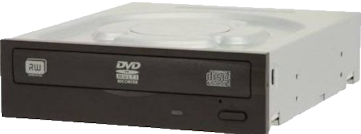 |
recommend electronic⇒Lite-On iHAS124-04 SATA Dual Layer DVD Drive | |||||||||||||||||||||||||||||||||||||||||||||
| asin | B002YIG9AQ | |||||||||||||||||||||||||||||||||||||||||||||
|---|---|---|---|---|---|---|---|---|---|---|---|---|---|---|---|---|---|---|---|---|---|---|---|---|---|---|---|---|---|---|---|---|---|---|---|---|---|---|---|---|---|---|---|---|---|---|
| This is Lite On’s basic internal DVD drive. Amazon.com sells it under 9+ different product numbers, for 9+ different prices, tracking each inventory separately. Spit! There is a fancier model the ihas125 with variable speed depending on disc quality and autobalancing to reduce noise. The ihas 124 is discontinued, but it is still sold. DVD Write 24X, DVD ReWrite 8X, DVD Read 16X, CD Read 48X, CD Write 48X, CD ReWrite 24X. Super AllWrite to read pretty well anything you can throw at it. | ||||||||||||||||||||||||||||||||||||||||||||||
| ||||||||||||||||||||||||||||||||||||||||||||||
| Greyed out stores probably do not have the item in stock | ||||||||||||||||||||||||||||||||||||||||||||||
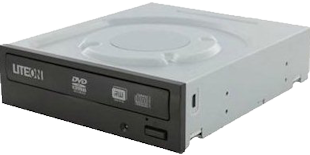 |
recommend electronic⇒Lite On iHAS324-07 Black 24X DVDRW 160ms/140ms | |||||||||||||||||||||||||||||||||||||||||||||
| asin | B00FMHIZ9E | |||||||||||||||||||||||||||||||||||||||||||||
|---|---|---|---|---|---|---|---|---|---|---|---|---|---|---|---|---|---|---|---|---|---|---|---|---|---|---|---|---|---|---|---|---|---|---|---|---|---|---|---|---|---|---|---|---|---|---|
| This is Lite On’s deluxe high speed internal DVD drive. Amazon.com sells it under 8+ different product numbers, for 8+ different prices, tracking each inventory separately. Spit! Specs of similar 524. DVD Write 24X, DVD ReWrite 8X, DVD Read 16X, CD Read 48X, CD Write 48X, CD ReWrite 24X. | ||||||||||||||||||||||||||||||||||||||||||||||
| ||||||||||||||||||||||||||||||||||||||||||||||
| Greyed out stores probably do not have the item in stock | ||||||||||||||||||||||||||||||||||||||||||||||
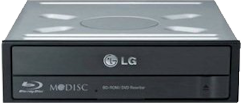 |
recommend electronic⇒LG Internal UH12NS30 BD-ROM Blu-ray Optical Drive | |||||||||||||||||||||||||||||||||||||||||||||
| asin | B00DVTBM2W | |||||||||||||||||||||||||||||||||||||||||||||
|---|---|---|---|---|---|---|---|---|---|---|---|---|---|---|---|---|---|---|---|---|---|---|---|---|---|---|---|---|---|---|---|---|---|---|---|---|---|---|---|---|---|---|---|---|---|---|
| You pay a fair bit extra for the ability to read and write blue-ray. Data Transfer DVD 16x, CD 48x. 4 MB buffer. Specs. | ||||||||||||||||||||||||||||||||||||||||||||||
| ||||||||||||||||||||||||||||||||||||||||||||||
| Greyed out stores probably do not have the item in stock | ||||||||||||||||||||||||||||||||||||||||||||||
A virtual clone is just a region of hard disk that behaves as if it were a fast DVD drive. You can copy its contents to and from a real DVD.
 |
This page is posted |
http://mindprod.com/bgloss/dvd.html |
Optional Replicator mirror
|
J:\mindprod\bgloss\dvd.html | |
 |
Please read the feedback from other visitors,
or send your own feedback about the site. Contact Roedy. Please feel free to link to this page without explicit permission. | |
| Canadian
Mind
Products
IP:[65.110.21.43] Your face IP:[18.222.121.156] |
| |
| Feedback |
You are visitor number | |


