


DSK (Dvorak Standard Keyboard) — a keyboard layout that is easier than QWERTY on the wrist muscles and gives about 10% faster speed to good typists, considerably better for the less dexterous. Note that you must follow the off page links to keyboard layouts, Kinesis and Maltron to see this entire essay. It grew too big for one page.
Previously, I had a Microsoft natural keyboard which I did not like, mainly because I kept accidentally hitting the Windows key which usually had catastrophic results and because when I typed fast it often failed to register the release of Shift | Alt | Ctrl. I did the DSK purely with the standard software drivers in Windows 95 and NT. Unfortunately during logon or during BIOS (Basic Input Output System) tweaking, I had to revert to QWERTY.
However, now I have a Kinesis Keyboard with the DSK in the keyboard firmware, so I no longer have that problem.
 & % # ! ( ) @ $ ^ * +
7 5 3 1 9 0 2 4 6 8 =
:,. P Y F G C R L "
?,. p y f g c r l /
A O E U I D H T N S ___
a o e u i d h t n s -
Shf ; Q J K X B M W V Z Shf
' q j k x b m w v z
Space
Dvorak worked for the US Navy in the days before I was born. He devised the layout. So we got at least one Good Thing™ for those billions we pour into the Navy.
Dvorak’s original design was somewhat different from the current ANSI (American National Standards Institute) standard. He rearranged the numbers as well. He had one hand key odd digits and the other even. The idea was, that since the low numbered digits 0 1 2 are used more frequently, they should be near the center of the keyboard. Scientific American did an interesting article on why, even in random tables of numbers, the digits 0 and 1 occur more frequently than 8 and 9.
He also devised layouts for people with only one hand. These can also be used by people with two hands, but whose other hand is occupied in some way as they type. See the actual layouts further down in this essay.
Back in 1872, Christopher Sholes designed the original QWERTY layout to slow you down as much as possible. Old mechanical typewriters would jam if you hit two keys too rapidly in succession. It was brilliantly designed to prevent you from doing this.
However, now that we have electronic keyboards, we want to do the exact opposite. We want to make it possible to hit two keystrokes in succession as quickly as possible.
Lee Merkel used this analogy to explain it: "QWERTY on today’s keyboards is like having a Maserati limited to a top speed of 40 because the early cars might break an axle over 40 on a bumpy road."
In 1934 The Andrew Carnegie Foundation gave August Dvorak (a distant cousin of the composer) two grants to design a new keyboard layout. In 1936 the new layout was ready. The US Navy ordered 4000 keyboards, then canceled.
The theory of the Dvorak Standard Keyboard (DSK ) is simple. The most commonly used keystrokes should be the ones easiest to do. The layout puts the common vowels oeui under your left fingers and the common consonants dhtns under your right. It is almost impossible to avoid touch typing.
What moose feces! Your fingers don’t move in straight lines anyway and distance of finger travel is only very loosely correlated with typing speed. What determines speed has to do with the anatomy of the human nervous and muscular systems. The only way to integrate all these complex factors is to perform experiments with real people!
DSK was developed in the 1930s. It is well tested in speed trials against QWERTY. DSK was the winner hands down. All the speed typing records are held on DSK. However, the real advantage of DSK is not speed, it is ease! You can type like blazes all day long and your hands don’t get tired and your wrists don’t ache. Because of wrist pain, I could never touch type on QWERTY because it made my wrists and fingers ache after even a few minutes, though I was one of the fastest four finger typists alive. With DSK, your hands aren’t forced to continually make awkward motions like some Hannon piano fingering exercise.
It is hard to find psychologically unbiased information about DSK. Here is why. It is a bit of an ordeal flipping over and naturally people don’t like to say to themselves, I went to all this effort for almost nothing. They then will tend to exaggerate the benefits to themselves and others. The people who go through the ordeal have to be pretty highly motivated to persist. On the other hand, people who give up part way through the flipover tend to tell themselves there would have been no point in persisting. They pretend to themselves they gave the DSK layout a fair trial when they in fact did not allow sufficient time to adjust. People vary quite a bit on how long the flipover takes. You may take considerably longer than the optimistic best case estimates.
My apprentices often used to hunt and peck on my machine. I was astonished how quick they were.
| DSK firmware vs software | ||
|---|---|---|
| Consideration | Firmware | Software |
| Cost | hundreds of dollars | free or cheap |
| Consistency | works identically for all operating systems | Needs a different solution for W95, W98 and Me than for W2K, XP, W2003, Vista, W2008, W7-32, W7-64, W8-32, W8-64, W2012, W10-32 and W10-64 for Linux than for OS9 and OSX. |
| Customisability | harder to customise, requires extra cost software to download the firmware should the new layout in firmware be lost. You could in a pinch recreate it from scratch. Generally you can’t remap (customise the layout) the shift and unshifted characters independently. To do that, you need a software assist. | In W95, W98 and Me, DSK is hard to customise. In W2K, XP, W2003, Vista, W2008, W7-32, W7-64, W8-32, W8-64, W2012, W10-32 and W10-64, it is easy to customise. You can remap the shifted and unshifted characters independently. |
| Switching back and forth | You hit a special button on the keyboard. | You reserve a special sequence such as left-Alt-Shift-0 or Ctrl-Shift-~ or Ctrl-Shift-`. The sequence must start either left-Alt-Shift and end with 0..9 ~ ` to select either QWERTY or DSK. |
| Portability | Carry your keyboard around with you and plug it into any machine you use. This gives you maximal typing speed since you don’t adjust to a different physical keyboard. However, it is awkward to carry a full size keyboard with you on business trips. Some people might not let you plug your keyboard in, e.g. the local library. | Carry your keyboard software you use and install it on any machine you use. Alternatively make do with the uncustomised DSK layouts that come with Windows. Many companies won’t let you install any software on their machine, even something as innocuous as a keyboard remap table. Sometimes you are forced back to QWERTY — e.g. at public terminal whether you use firmware or software. |
I use a Kinesis Keyboard with DSK/QWERTY in hardware. This is the ultimate way to go.
To get a DSK keyboard cheaply, check out eBay.
Keytronic sells a Dvorak conversion kit on special order.
The Northgate Omnikey Ultra comes standard with switches to select one of four Dvorak layouts in addition to QWERTY. The optional matching keycaps cost about extra. You can get ANSI, or the original with the 75319 02468 ordering, or the left hard only, or right hand only variants. Unfortunately Northgate went bankrupt and the keyboards are no longer manufactured. You might find one in old stock at some retailer or at a swap meet. These keyboards are much more rugged than most other brands.
The Northgate 102 keyboard has only two-handed ANSI Dvorak, with no function keys across the top. This is what I used after my beloved Omnikey Ultra passed on after many years of hard pounding.
The Omnikey design is now being manufactured under the Avant name. User Manual.
Fentek sells several models at prices comparable to QWERTY models. Some don’t have DSK in firmware. You still need remapping software.
TypeMatrix make low-cost switchable keyboards.
If you have an Apple computer, make sure you buy a keyboard designed for the Mac with an USB (Universal Serial Bus) interface instead of the PS/2 interface.
DVORAK.COM can also be used for fine tuning a keyboard layout — even QWERTY, to swap a few keys around. You can download it complete with source.
It is designed for AT (Advanced Technology) and later computers, but might work on some XTs if you loaded the DOS KEYB command first:
rem setting up a DSK keyboard in the DOS box
C:\dos\keyb.com us,,C:\dos\keyboard.sys
If you want to concoct your own more complex keyboard with accented keys, dead keys, Alt-Gr etc, use ESPAN.COM as a model. It is a Spanish QWERTY keyboard driver. You can download it complete with source.
I fiddled about with my layout over a period of months fine tuning it to suit my work. For computer programming, especially in Java you use the { } and ( ) keys a lot. It might make sense to move the following keys to the middle of the top row, similar to DSK classic layout.
(  )  !  {  }
9  0  1  [  ]
It might also make sense to reverse the meaning of caps on the [ ] keys so they meant
{ } without caps.
You can gradually fine tune your layout to suit your own particular finger strengths, character frequencies and character pair combination frequencies. You just try out various layout changes and one will feel distinctly more pleasant and easeful.
You can rearrange keycaps on an IBM (International Business Machines) keyboard but not most other brands. Just pop them off with a screwdriver and snap them back on in their new position, being careful to center the little springs. On the IBM keyboard almost all keycaps are shaped identically so you have complete freedom to rearrange them. On most other keyboards, the keys are sculpted so that each row has a different shape.
Note that moving the keycaps has no effect on the codes generated by your keyboard. You still need software to logically rearrange the keys.
For W2K, XP, W2003, Vista, W2008, W7-32, W7-64, W8-32, W8-64, W2012, W10-32 and W10-64, Microsoft Keyboard Layout Creator is much more user friendly and flexible. It creates a DLL (Dynamic Link Library) keyboard driver rather than a simple keyboard map. It lets you control which Unicode character is generated by hitting each key plain, or with any combination of Alt-Shift-Ctrl. AltGr is treated the same as Alt+Ctrl. This lets you effectively move the top and bottom letter on each key around independently. You can start with an existing keyboard driver and modify it. Unfortunately, it won’t display the plain and shifted keyboard characters simultaneously. It does not work in W95, W98 and Me. Unless you can find an existing driver very similar to what you want, it can be quite tedious, since you have to explicitly code every combination.
For W2K, XP, W2003, Vista, W2008, W7-32, W7-64, W8-32, W8-64, W2012, W10-32 and W10-64, TypeMatrix offers a free remapper you can download.
For W2K, XP, W2003, Vista, W2008, W7-32, W7-64, W8-32, W8-64, W2012, W10-32 and W10-64, PC (Personal Computer) Magazine puts out TradeKeys that works in all versions of Windows to let you remap the keyboard any way you want. About the only thing you can’t do is move the punctuation above the digits to different digits. The utility is free, but you need a subscription to access it. The cheapest subscription for gives you three downloads and one month access. It works by creating a *.reg file to insert a table into the registry that the keyboard driver uses to remap the keyboard scan codes before it does anything else. This means the remapping works in conjunction with the remapping the keyboard driver. It is probably easiest to do both the DSK remapping and your customisations with TradeKeys and use a standard QWERTY layout driver. If you use a DSK driver, your TradeKey remappings are done in terms of the base QWERTY keys, not as fine tunings after the DSK mapping is done.
In W2K, XP, W2003, Vista, W2008, W7-32, W7-64, W8-32, W8-64, W2012, W10-32 and W10-64, you can define registry entries to remap the keyboard scan codes. This is not for the faint of heart.
For the adventurous, there is the Microsoft SDK (Software Development Kit) which has instructions on how to write custom keyboard drivers. Unfortunately, they work quite differently in W95, W98 and Me and NT, W2K, XP, W2003, Vista, W2008, W7-32, W7-64, W8-32, W8-64, W2012, W10-32 and W10-64. You can then do whatever you want, including inventing dead keys, special shift modes, remap the plain and shifted characters on each key independently, etc.
You can get replacement coloured keycaps or key labels from Hooleon. The also sell stick on home key bumps.
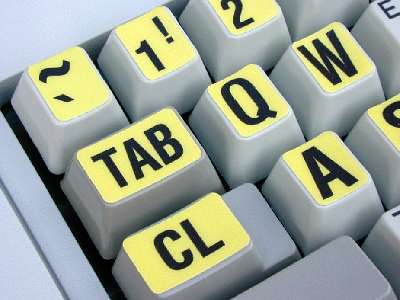
If you can afford it, go whole hog and get a Kinesis keyboard. A good keyboard will pay for itself quickly in terms of increased productivity. Failing that try the Windows built-in DSK and then tweak it with the tools described under Roll Your Own.
Not having them actually helps you learn to touch-type because it prods you to rely on feel rather than peeking. Back in the 1950’s, typing teachers used to put blank covers over the keys of mechanical typewriters.
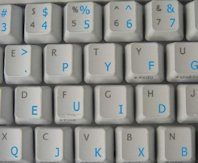
QWERTY legends make it easier for others to use your keyboard.
DSK legends are mainly a conversation-starter. People see your unusual keyboard and get curious.
The Kinesis keyboard I use now has dual legends, with QWERTY dominant giving all three advantages:
 |
recommend electronic⇒Dvorak Simplified Keyboard Stickers | |||||||||||||||||||||||||||||||||||||||||||||
| asin | B0011FI3O8 | |||||||||||||||||||||||||||||||||||||||||||||
|---|---|---|---|---|---|---|---|---|---|---|---|---|---|---|---|---|---|---|---|---|---|---|---|---|---|---|---|---|---|---|---|---|---|---|---|---|---|---|---|---|---|---|---|---|---|---|
| Transparent stickers to apply to a QWERTY keyboard to help you learn the DSK layout. Don’t expect stickers to last that long. These are just training wheels. | ||||||||||||||||||||||||||||||||||||||||||||||
| ||||||||||||||||||||||||||||||||||||||||||||||
| Greyed out stores probably do not have the item in stock | ||||||||||||||||||||||||||||||||||||||||||||||
I still have to revert to QWERTY to use the electronic mail terminals in airports and when I am setting up a virgin machine when all that will run are the diagnostics.
It took maybe a month before I gained even reasonable speed at DSK. It took maybe another five months before I was faster than I was originally, but now that pain is behind, it was worth it. It was very embarrassing working in an office situation having people hear my painfully slow keystrokes. Green, why are you mucking about with that. We’ve got a job to do!;
I took so long to learn DSK because I could not quit QWERTY cold turkey. I used an Apple Lisa on QWERTY during the day and an IBM XT on DSK at night. There was no DSK software for the Lisa. I found that using only two fingers to type when I was forced to use QWERTY did the least damage to my slowly developing DSK skills. However, to get the job done I often had to revert to QWERTY even on the IBM.
Only a minority of DSK typist manage to retain the skill to touch type QWERTY. In general, you cannot be a bilingual touch typist. I get mail from time to time telling me Stuff and nonsense, I type equally well on both. However, most people find their finger reflexes have to be tuned to one system or the other. If you start young and flip back and forth, every month or so, you have a better chance of becoming skilled in both. In general though, you just hurt yourself by trying to be bilingual. I suspect that those bilingual typists would be even better DSK typists if they let the QWERTY go. At least, any use of QWERTY while you are learning DSK will set you back.
There is a horrible in between period when your subconscious reflexes for DSK start to take over. You lose your ability to type QWERTY rapidly. There you are stuck in the middle for a while unable to type rapidly on either system.
However, as I said at the beginning, you go through the conversion once and ever after you reap the rewards — every day for the rest of your typing life.
If I were to do it again, I’d wait till a time when I could guarantee that I could type DSK 100% of the time for at least two months without ever having to touch a QWERTY keyboard. I’d like to wait till a slack period so I wouldn’t be tempted to revert to QWERTY to get the job done. But had I done that, I’d have waited forever and I’d still be stuck on QWERTY. There is no such thing as a slack time, so perhaps all you can hope for is a time when no one is watching you too closely.
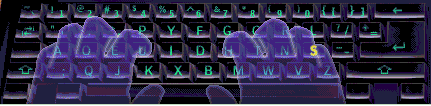
Top left of keyboard is pushed slightly away from you.
Keyboard is offset slightly to the left of the centre of your body.
Your arms should be almost level tilting up slightly to reach the keyboard.
Left index finger handles 4 5 6 p y u i k x
Left middle finger handles 3. e j
Left ring finger handles 2, o q
Left baby finger handles Esc 1 tab ' ctrl a ` ;
shift
Right index finger handles 6 7 f g d h b m
Right middle finger handles 8 c t w
Right ring finger handles 9 r n v
Right baby finger handles 0 \ = bs l / ] s - [ Enter z
shift
Generally, a finger handles keys on a back-slanting row. The exception is 6 which is sometimes handled by the left index finger.
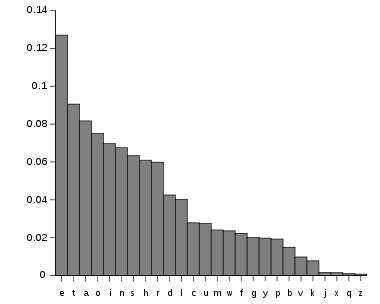
Depending whom you ask, the frequency of use goes roughly like this: etaonhisrdlucmwgfypbkvjzxq. Note minor differences from the chart above. In designing your own layout keep these frequencies in mind when you place keys in the prime real estate or out in the boonies. The Dvorak home row in contrast, is aoeui dhtns. A more sophisticated layout takes the frequencies of various letter pairs into consideration as well. Different languages have different frequencies, so you need a variant layout for each language.
I was once the chief instructor at a computer summer camp. I interviewed each child as he came in and assessed his typing skills. Some of these kids could type in raw hex coding with perfect accuracy at incredible speed. I asked each of these wunderkinds how he learned to type so well. They invariably answered Typing Tutor.
Such programs can be used to teach yourself either QWERTY or DSK. It automatically adjusts to drill you on your weakest letters.
I tried the Kriya Typing Tutor (now defunct) for a while and on one memorable occasion clocked 100 words per minute on the standard typing test. There is absolutely zero chance I could have attained that sort of speed with the QWERTY layout.
I have not used such tools for a long time, so those two may not be the best anymore. There are surely many you can find search engine. The trick is to find one with an addictive game. If you know of a good one to recommend for learning DSK, please email me. For candidates see Typing Tutor.
It would not be that hard to create a Typing Tutor program in Java. It might have an analog of the Letter Invaders game. It could have introductory lessons that introduce the keys gradually starting from the centre of the keyboard and working out, along the home row, along the top row, along the bottom row and finally along the numeric row. You could filter a dictionary to find words that can be typed with the current subset of letters. Finding suitable exercise words is much easier than with the QWERTY layout. There is not much point in writing one where there are scores of them out there to evaluate.
 Learning More
Marcus Brooks Dvorak Page is the most comprehensive and has links to dozens of others.
Freelance Communications has published a book on Dvorak keyboards called The Dvorak Keyboard. They also put out a quarterly called Dvorak Developments.
Freelance
Communications
P.O. Box 1895
Upland, CA (California)
91785
You can look up DSK Dvorak + keyboard in any of the Internet search engines.

Spark on CBC (Canadian Broadcasting Corporation) Radio had on an expert from Microsoft (who had never used DSK ) who claimed there was absolutely no justification to use DSK under any circumstances. His argument went like this:
You could expect at best only a 10% speed improvement. It is not worth it.
I counter this way:
The one big question you want to know is, how much faster will you be? The problem is this thing called the bell shaped curve. Some people gain a lot, others a little. The only way to find out where you personally are on the curve is to do it. Once again, my bottom line recommendation: If you can afford it, go whole hog and get a Kinesis keyboard. A good keyboard will pay for itself quickly in terms of increased productivity.
 |
This page is posted |
http://mindprod.com/bgloss/dsk.html |
Optional Replicator mirror
|
J:\mindprod\bgloss\dsk.html | |
 |
Please read the feedback from other visitors,
or send your own feedback about the site. Contact Roedy. Please feel free to link to this page without explicit permission. | |
| Canadian
Mind
Products
IP:[65.110.21.43] Your face IP:[3.128.199.175] |
| |
| Feedback |
You are visitor number | |


