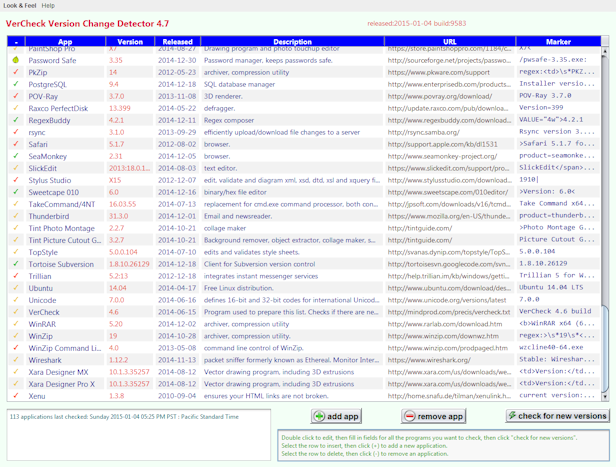
This program has gradually lost the ability to connect to websites. I have no idea why. The program is no longer useful.
This program will let you quickly check if there are new versions of any of your apps. Read the precis to understand how it works. Or just click Check For New Versions to see if there are any new versions for any of the default set of applications. The results are summarised at the utilities entry in plain HTML (Hypertext Markup Language).
I update the code for Vercheck frequently, sometimes several times a day. The means the downloaded version will soon be out of date. Download it primarily if you want to study or modify it yourself. The easiest way to use it to monitor the standard list of application or your own applications is to run it as an Applet getting its jar each time from the http://mindprod.com/applet directory.
This program is an implementation of the VerCheck student project outline. Reading it will help you understand how this program works. If you are a Java programmer curious how the program works, you can either download the source or view source code in JDisplay format.
|
| ||||||||||||||||||||||||||||||||||
 .
. Get New Java
Get New Browser
Get New Java
Get New Browser

| Package | Version | Released | Licence | Language | Notes | ||
|---|---|---|---|---|---|---|---|
VerCheck Version Change Detector |
4.8 | 2015-11-30 | free | Java |  ❘ precis
❘ screenshot
❘ browse source repository
❘ precis
❘ screenshot
❘ browse source repository
for the current version of VerCheck Version Change Detector. Checks applications to see if new versions are available.  3.9MB
zip for VerCheck Version Change Detector Java source, compiled class files, jar and documentation to run on your own machine either as an application or an Applet.
3.9MB
zip for VerCheck Version Change Detector Java source, compiled class files, jar and documentation to run on your own machine either as an application or an Applet.
Runs on any OS that supports Java e.g. W2K, XP, W2003, Vista, W2008, W7-32, W7-64, W8-32, W8-64, W2012, W10-32, W10-64, Linux, LinuxARM, LinuxX86, LinuxX64, Ubuntu, Solaris, SolarisSPARC, SolarisSPARC64, SolarisX86, SolarisX64 and OSX. First install the most recent Java. To install, extract the zip download with WinZip, (or similar unzip utility) into any directory you please, often J:\ — ticking off the use folder names option. To check out the corresponding source from the Subversion repository, use the TortoiseSVN repo-browser to After you have installed the jar, you can run it as an application. Type: java -jar J:\com\mindprod\vercheck\vercheck.jar
adjusting as necessary to account for where the jar file is. download ASP PAD XML program description for the current version of VerCheck Version Change Detector. VerCheck Version Change Detector is free. Full source included. You may even include the source code, modified or unmodified in free/commercial open source/proprietary programs that you write and distribute. Non-military use only. |
||
 |
This page is posted |
http://mindprod.com/applet/vercheck.html |
Optional Replicator mirror
|
J:\mindprod\applet\vercheck.html | |
 |
Please read the feedback from other visitors,
or send your own feedback about the site. Contact Roedy. Please feel free to link to this page without explicit permission. | |
| Canadian
Mind
Products
IP:[65.110.21.43] Your face IP:[3.146.255.249] |
| |
| Feedback |
You are visitor number | |